Showing posts with label Mobile Tricks. Show all posts

HOW TO RETRIEVE DELETED MESSAGES FROM DEVICES

Smartphones have taken over the market of gadget by storm in the past recent years. Gone those days when people used their handsets only for calling and texting, now smartphones have become an alternate for laptops and PCs. But today also we have the fear of losing important data like contacts, sms, photos and other important files, to help the users get rid of this fear smartphones have different apps and back up options to keep their data safe and retrievable.
People using smartphones at times delete some very important messages by mistake and later realise that they should not have been deleted. Finally developers have come up with various ways to recover your deleted messages. Although we delete text messages, numbers, and call log from the device the sim card still contains the files and technically speaking don’t delete it permanently.
Sim cards are just like mass storage medium and don’t immediately delete the matter from their memory. In this article we would discuss and the ways to Retrieve deleted messages or either save them elsewhere.

 TIPS AND TECHNIQUES RETRIEVE DELETED MESSAGES


  • If your text messages are stored on to the sim card, a smart move is to download a Sim card recovery programthrough which the user can retrieve deleted message back on to the device. Data Doctor Recovery app is an easy to use recovery program that helps you restoring all your deleted text messages to inbox, outbox or even saved messages from the even a defective SIM card.
  • If you are an Android user – File Expert is a wonderful file manager’s app, Apart from accessing local files, data and applications on your handset, it also enables you to restore deleted text messages, you just have to manage the software step by step and you can archive your text messages.
  • For iOS user – Document 2 Free file manager is one of best apps to manage and back up your data and restore data back to your handset which would also include deleted text messages.
  • Users can download FExplorer, Which is extremely efficient with recovering messages. It comes with step by step instructions to help guide you through the process.
  • Another way to Retrieve deleted messages is from the open system folder which stores all your messages whether inbox or outbox and even your deleted messages and ensures to keep an account of your media in the mobile phone.
  • Users can even opt for data back-up applications and cloud services like Drop Box , iCloud for the Android and iOS platforms respectively or by open sources known as third party applications which actually helps you to retrieve important text messages
So if you are looking for deleted messages on the device you need not worry as this major problem can be solved using the different tools and apps that can downloaded through the Apps store provided with every OS platform. We hope that the tips and suggestion shared through this article may have helped in solving your problem of losing important messages forever. Although not every technique mentioned here might work so you may have to go for other options but with different apps and techniques available you would never loose on your messages anymore.

WHATSAPP TRICKS AND TIPS THAT YOU MUST KNOW

The Whatsapp Messenger is an application that has been voted as being one of the top messenger applications by most users thus far.  When it comes to having an extensive list of premium features and overall messaging capabilities, the Whatsapp Messenger is known for having them all and being very user-friendly at the same time.
There are even many different Whatsapp tricks that can be used in order to enhance the efficiency and overall operational quality of this particular application.

BEST FOUR WHATSAPP TRICKS


1)Becoming an Official Spy
One of the most popular Whatsapp tricks that are currently being used is the opportunity to become a spy.  You can use this particular Whatsapp trick to spy on the activities of someone else’s account within this specific program.  In order to take full advantage of these capabilities, you simply just need to adjust the settings within the rooted device.  After those settings have been opened and fully accessed, taking note of the actual MAC address of that phone’s internal Wi-Fi connection is the only thing that will need to be noted.
2)You Do Not Need a Number
There is also another Whatsapp tricks that can allow you to use this program without ever having to use a person’s specific number. This is accomplished simply by manipulating the actual verification request.
Many people have heard about this in the past, but have had no idea where to start in order to take full advantage of this capability.  The verification request will appear almost immediately after the program has been installed, so users just have to pay close attention and look out for it.
3)Retrieving Deleted Messages
Another great Whatsapp trick is that users are able to actually retrieve messages that have already been deleted.  In order to have direct access to these messages, all that needs to be done is a particular file (the msgstore.db.crypt file) will need to be transferred to a different mobile device and then restored within the new device’s Whatsapp program.
Check this Awesome trick in detail here > GET BACK DELETED WHATSAPP MESSAGES
4)Sending Pictures to Other Pictures
Whatsapp is also capable of performing some pretty amazing functions simply by collaborating with other programs and applications as well.  For example, there is an application known as Magiapp that can work directly with Whatsapp in order to complete a fairly impressive picture transfer.  You can send one picture to another picture just by using this application, which is usually something that is done more for personal purposes instead of professional.

WHAT IS TROJAN HORSE VIRUS AND HOW TO REMOVE IT

Are you facing virus threats on your computer? Is your computer behaving abruptly or are you the victim of a disk crash?  Is your computer hacked by a Trojan horse virus attack? A Trojan horse virus attack is one of the most dangerous threats to your computer and needs to be fixed immediately. If it is not protected on time, then the virus can lead to failures in connecting to the IRC network or even worse can lead to your computer hacking and then your computer might be used by some anti social elements in shaping some criminal attacks.

ABOUT TROJAN HORSE VIRUS


Before knowing how to remove this evil threat first one should know what actually a trojan horse is? It is a security breaking program, also malicious to your computer and is disguised in some benign object. It can be downloaded unknowingly through any document, executable, zip, movie or music file and unleashes a dangerous malware into your drive on executing the files.
This malware can completely wipe your disk or can even send your credit card details and passwords to any stranger on the web. It is not at all operating system specific. It can affect any operating system but affects windows more promptly due to its popularity and weaknesses. This is a silent attacker and many people come to know about its attack after it has infected other connections.

HOW TO REMOVE TROJON HORSE VIRUS


  • There are many ways one can avoid itself from being a victim of this malicious virus but the best is to be attentive in downloading and executing files form an unknown source or person and also doing a background check of it, if downloading from a known source. But if you have already been a victim of it then you need to take immediate steps to remove it from your drive before it creates some major problem. You need to repair and then reformat your system completely to remove all malwares which may take from several hours to several days of time.
It is quite possible that the removal has not been done properly and may lead to coming back of the virus again and again in such cases you must take stronger measures to curb this problem.
  • Firstly you need to have anti-virus software installed in your system and that too an updated one or else they will miss the latest species of Trojan horse. Anti-virus software helps prevent the system from many Trojan viruses. Then make sure you have updated your operating system as well with all new security patches.
  • One may also have to install Anti-trojan programs like The Cleaner which specialize in Trojans. Once it is installed reboot your computer in safe mode and use the cleaner to clean all registries and drives for any Trojan suspected. Make sure the internet is unplugged while cleaning. Once cleaning is complete reboot the system again.
  • After using the cleaner make sure that you have updated your operating system and have changed all the passwords. Once the system is repaired make sure to take a backup of every data and reformat the system completely.
Get Our Daily Updates Directly to Your Inbox, Subscribe to blog updates.

BBM FOR ANDROID & IPHONE USERS IS FINALLY HERE

BlackBerry Messenger commonly known as BBM is the best way to connect and share instant messages, pictures and more for free, in real time. The official version for BlackBerry is now available for Android. Some of you might be surprised to know that BlackBerry’s BBM client has a whopping 60 million users as of a few months ago, but it`s not as much as Whatsapp’s 200 million, So BlackBerry officials thought to introduce BBM for Android & iphone
BBM lets you protect your privacy by controlling various features and setting in it.

HOW TO USE BBM FOR ANDROID & IPHONE?


The PROCESS : Blackberry have recently launched BBM for Android & iphone Users,Anyone can sign up for the service through a BlackBerry ID which is required to log-in into the app. If you don’t have a BlackBerry ID, you can create one by providing your email ID and choosing a password. After singing in the BBM for iOS app assigns you a PIN in a manner similar to BlackBerry Messenger it links with the phone’s unique PIN number, if you try to access your account from another device with the same BlackBerry ID, it will ask if you`d like to switch the account to new device, so one ID can be used only on one device.
Then you can add friends by sharing your PIN with them via SMSemail and social networks in addition to QR codes. If two IPhone have BBM installed then the PIN would first appear in messages and requires other users to manually enter it. The BBM for Ios looks like it`s been adopted from BlackBerry 10 device in terms of users interface. It reveals a slide out menu for Chats, Contacts, Groups, Updates and Invites.
Coming to the message part, you can chat with a single user, in groups where you create or join a group and chat and even be in a group with people who aren’t part of your BBM contact list up to 30 members can be added in a group. Text, emoticons, voice notes and pictures can be shared in chats, and sending PDF documents are not possible in BBM.
The app lets you know if your message has been delivered and even read by the other users by placing a ‘D’ and ‘R’ sign next to the message. It also lets you know when other person is typing message by a ping alert.


DEFECTS : Unlike other chat apps such as WhatsApp, Line and WeChat, BBM doesn’t support video file transfers and sharing contacts. It also doesn’t offer push to chat, however BlackBerry mentions that BBM Voice (voice chat) will also be introduced to BBM for iOS and Android in future.
On native BlackBerry OS platform, it offers BBM Voice calling and BBM Video calling (only on BlackBerry 10).

TRICK TO ACCESS A WINDOWS DESKTOP FROM YOUR SMARTPHONE OR TABLET

Yes,you can Access a Windows Desktop from Your SmartPhone or Tablet. IPads and android tablets or Smartphone can’t run windows app locally, but with this you can remote your windows desktop, even with a physical keyboard. Many apps has been developed and launched like Microsoft remote desktop appTeamViewer for Remote Control, among which Microsoft app is mostly used for professional use while the other app can also be used for personal uses.

MICROSOFT’S REMOTE DESKTOP APP 


This app has reduced the work load from one’s head of staying in the home and working all the day and cancelling the vacations and many more just because of the work info is available in your PC. With Microsoft remote desktop app, you can connect to your work resources and remote PC from anywhere you feel like working. This app is mostly used for business and professional use rather than the personal use.
Features of this app :
  • Access your desktop with your phones easily.
  • Rich multi-touch experience with remote desktop protocol (RDP).
  • It has an outstanding feature or technology, namely Network Layer Authentication which secure connection to your data and applications.
  • High quality video and sound streaming.
Review for this app :This app is friendly for the business related persons or for the professional use but not so friendly for the personal use.

TEAMVIEWER FOR REMOTE CONTROL


This app is friendly for the personal use too no matter wherever you are, rather than controlling your own computer you can also remotely troubleshoot your relatives PC.
Features : 
  • Access to computers (windows, Mac, Linux) is possible also during a telephone call.
  • Transfer the files from your PC to phone or from phone to PC.
  • Automatic quality adjustment.
  • Remotely reboot the computer.
  • TeamViewer free is for private use only e.g. to access or solve your or your friends computer problems.
All you have to do is Download an Install Teamviever on Your Desktop and Mobile, after installing on your smartphone you will have to login with the details that teamviewer window displays.

Other Options: Other than these two apps you surely have other options too if you are not friendly with both of them.
Splashtop: This is another popular remote desktop app that people reportedly has said that it is faster. But unfortunately this is not a free app as it may cost you around $20 at regular price. And to use it over internet you need to buy an additional “Anywhere access pack”. This app can be used or purchased if you don’t mind spending money or if you need a faster app to complete your work fast.

Conclusion: With the development of these apps both personal and professional works are carried out easily and in a better manner with easy access.

FREE APPS TO LOCK WHATSAPP AND OTHER ANDROID APPS

Smartphones are almost like a people magnet, everybody who sees one tries to use it no matter if the device belongs to them or not. This kind of situation can arise in office or at Home as well where saying no to the person taking a peek in to your smartphone is not an option. Thankfully, there are applications in the Google Play store that can make sure that your device stays secure and as private as you would like it to be.
We keep important apps in our device like Watsapp, Facebook and many more chatting options, and frequently they are checked up by many peoples, so let’s see some Privacy apps that can protect our important app. And as always, we have selected only the best Free Apps To Lock Whatsapp and other Apps for which you don’t need to spend a Penny.

FREE APPS TO LOCK WHATSAPP AND OTHER APPS 


1.Privacy Manager : It is designed in such a way that it becomes your basic privacy manager. It has the ability to keep your pictures, apps and contacts private, as well as some extra things included. It also includes a password manager so you won’t be left with an unsecure application storing a list of your passwords to your important accounts.
The free version only lets you lock up to 10 images at once, and only one contact for disguising texts/calls. The limitations are minimal, so you can probably get by with just the free version instead of paying $4.99 for the full version.

2.App Lock This app is sure to secure your phone from guests as it is also said that it is “guest-proof” That means your kids, friends, parents, etc cannot view photos, messages and even your apps. You can also give especial ability to shut down all specific functionalities of your device whenever you want, including a basic pattern/PIN lock, a quick-lock widget, ability to lock on incoming/outgoing calls, lock system settings, lock the Google Play Store, a quick lock switcher on the status bar, a re-lock policy (allow short exit, no need to unlock again), and prevent apps from being uninstalled.

 3.Hide It Pro :As it is commonly used app, more than 320,599 users’ use it worldwide. It has special feature that makes it unique from other apps, as it makes one to hide anything on their device, and does not let anyone know that anything is being hidden. The app is cleverly designed as a fully-functional audio manager, and lets you categorize your media into folders of your choosing.
Hide It Pro offers a “media suite” with all of your hidden content, so you won’t have to keep “un-hiding” it when you want to view it.
So Guys these are Best Free Apps To Lock Whatsapp and other installed apps for your Android Phone. Dont forget to Subscibe for our daily updates.

TRANSFER FILES BETWEEN PC AND ANDROID WIRELESSLY

Do you transfer files by connecting your mobile phone to PC with the help of USB, thus connecting and disconnecting USB gives you trouble, so turn into wireless, thus reducing your tension of wire. The benefit of wireless is that it is easy to connect and there is fast transfer of files. Here are the few wireless apps which have highest reviews in Google Play store and that will help you to Transfer Files between PC and Android wirelessly
Also Read: 5 best Websites to Download e-Books for Free.

APPS TO TRANSFER FILES BETWEEN PC AND ANDROID


Airdroid is an top app to Transfer Files between PC and Android. It is available at that size of 6.4 MB and requires Android 2.1 or up. It has the highest rating for wireless data transfer. It is easy to use and even looks much pretty. The Key feature supported by this app is that— desktop SMS service, wireless transfer of files and media data, phone locating technique app management, camera and screenshots.

Its size varies with devices. It is commonly known as an Android File Manager app but can also be used to transfer files wirelessly, select “Remote Manager” under the “Fast Access” list, you can find local network you are connecting to. Tap “Turn on”, find the given ftp address, then input the ftp address in the address bar of computer on your pc. As long as you get used to this app you will find it more than easy to use it.

It is available at the size of 2.8 MB and requires android 2.0 or up. It is not as easy to use. The first time you run this app, you are required to set service port and password for your connection. Tap “start server” an IP address is generated for your device, input The IP address and password on computer browser, there will be a page displayed which looks similar to desktop.
3CXDroid also supports USB mode, Desktop SMS, Gallery Viewer, Media Player, FTP Server, WiFi Keyboard, Webcam, Screen Capture, Contact Manager, Remote Call, Wallpaper Utils, APK Web Installer, Terminal Emulator, Logcat, etc.

 CONCLUSION :

With the help of such apps our work gets easier and better, and we don’t need the maximum use of USB or any other wiring, which make these apps unique and is greatly appreciated by the users. So what are you waiting for, don’t be in old fashion of wiring stuff just download the apps and enjoy life more easy.

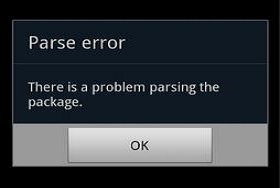
FIX THERE IS A PROBLEM PARSING THE PACKAGE ERROR

Android is the most popular Mobile Operating System today. The reason is because of its Versatility, User Friendly and Easy to Use for all Users. There is not Doubt that Most People Prefer Android ahead of other Mobile Operating System.
But this Doesn’t Mean you will never Face any Problem or Error while using Android Smartphones. We all like to Install Different apps or Games in our android smartphones but Sometimes while installing you my be Displayed an Error which says “There is a Problem Parsing the Package
So if you face this kind of error while Installing any App or Game in your Android smartphone and want to get rid of it, then Do not worry because here in this article i am going to discuss About this error, The Reason and How to Fix it Etc.

REASONS OF THERE IS A PROBLEM PARSING THE PACKAGE ERROR

You may get this Error Due to following Reasons:
  1. The Downloaded .apk file is Currupted or not fully downloaded
  2. You might have turned off “Allow installation of apps from Unknown Sources”
  3. If the App is not Compatible with the Hardware or the Version of OS you are using.


HOW TO FIX THERE IS A PROBLEM PARSING THE PACKAGE ERROR


So Now that we know why There is a Problem Parsing the Package error occurs, we can now easily find a fix to this Problem.

1. ALLOWING INSTALLATION FROM UNKNOWN SOURCES:

We tend to download .APK files from Google Play store but sometimes We even download it from unknown sources and hence android don’t Allow us to install the app.
One of the most Common fix to this problem is to Turn on “Allow installation of apps from unknown Sources”. To do so Follow the Below Simple steps
  • Go to your Device Setting Menu
  • Scroll down and Click on Applications
  • Now Check the Box of Unknown Sources to allow installation of non Market Applications
After Completing the Above Simple steps you may now try and install the app which was showing error.

2.INSPECT YOUR APK FILE:

If the Above Fix do not work to fix the error then you may now try to inspect the apk file that you downloaded. Check it the file is Fully downloaded and is not Corrupted.
If you have downloaded the apk file from any other place rather then Google play store then Make sure you download it from Google play store this time. Try to install it Now.

3.APP IS NOT COMPATIBLE WITH YOUR DEVICE OR OS:

If you are still not able to Get rid of There is a Problem Parsing the Package Error then it clearly indicates that the file that you have downloaded is not Compatible with your Device hardware or Operating System.Try to Install it on another Android Device which has better hardware and Higher Version of Android Installed in it.
So these were Some of the Fixes that will help you to Tackle with the There is a Problem Parsing the Package Error Message. if these Methods works for you or you have any other solution to this Problem then Feel free to share it with Us in Comments below.

HIDDEN ANDROID SECRET CODES THAT YOU MUST KNOW

We all know that Android is one of the leading Mobile Operating system. Almost Every House atleast have 1 Android mobile. We all love to Tweak and play tricks with Android Smartphones. Each day we tend to learn More and more about Android Smartphones.
The Popularity of Android is just not because it is Owned by Google but also there are Tons of apps available in Google Play Store for almost every task you can think of.
You might be Well Versed with Android Operating system but you might not know Some Hidden Android Secret Codes that you used to Explore more about android.
Today I will share some Cool Hidden Android Secret Codes that will help you to know more about your Android smartphone and will ease up your Different tasks

HIDDEN ANDROID SECRET CODES

*#*#778O#*#* = Factory Data Reset
*#*#I472365#*#* = Quick GPS Test
*#*#0673#*#* OR *#*#0289#*#*  = Audio Test
*#*#2664#*#* = Touch Screen Test
#’#273283*255*663282*#*#* = Backup Media Files
*#*#0283#*#* = Packet Loopback Test
*2767*3855# = Reinstalls The Phones Firmware & Format Your Phone
*#*#232339#*#* OR *#*#526#*#* = WireIess Lan Test
*#*# 1575#*#* = Different GPS Test
*#*#4636#*#*‘ = Complete Information About your Phone
*#*#2663#*#* = Touch Screen Version
*#*#232337#*# = Displays bluetooth Device Address
*#*#4986*2650468#*#* = PDA, Phone. Hardware, RF Call Date
*#*#44336#*#* = Displays Build Time
*#06# = Displays IMEI Number
*#*#8255#*#* = Google Talk Service Monitoring
*#*#I I I I#*#*   |  *‘#*#2222#*#* = FTA Software Version FTA | Hardware \/ersion
*#*#3264#*#* = Rom version
*#*#23233I#‘*#* = bluetooth Test
*#*# 1234#’#’ = PDA and Phone Firmware Info
*#*#0*#*#*= LCD Display Test
*#*#0842#*#* Vibration and Backlight Test
*#*#0588#*#* = Proximity Sensor Test
*#*#232338#*#* = Wi-Fi Mac Address
*#*#7262626#*#*= Field Test
*#*#34971539#*#* = Camera Update
*#*#19732840#*#* = Enable Test Mode
So the Above List Consists of almost 27 Android secret Codes that you might have not known but Since i have shared them here now you are aware of them. So use them whenever you Wish to Check and explore more about your Phone.


Previous PostOlder Posts Home